

By Zain Tareen
Founder, CEO & Managing Partner, Acgile
Inverting the Pyramid: How to Insert a New Super ParentAbove Your Root NetSuite Subsidiary
The hidden General Preferences override date, the high-stakes legal notice, and the step-by-step framework to safely execute a global hierarchy restructuring.
Inserting a new super-parent above your root NetSuite OneWorld subsidiary is possible but high-stakes. Learn the hidden General Preferences override date, the legal notice requirement, and the step-by-step framework to restructure a global subsidiary hierarchy safely.
Ask any veteran NetSuite consultant how to handle a corporate inversion, international restructuring, or a private equity acquisition where a brand-new entity needs to sit at the absolute top of an active OneWorld hierarchy, and you will usually get the same grim answer:
“You can’t do it. The root parent subsidiary is permanently hard-coded into the database. You have to spin up a new instance or pay Oracle professional services six figures to rewrite the ledger architecture.”
For years, that was completely true. NetSuite treats the apex subsidiary as the structural foundation for all consolidated exchange rates, elimination balancing, and cross-subsidiary accounting workflows. Because altering the top of the tree can severely destabilize historical financial tracking, the “Parent Subsidiary” field on your root entity is completely grayed out and locked.
However, there is a highly guarded, unadvertised system bypass built directly into NetSuite’s global architecture. By deploying a transient date-based preference lock and accepting a heavy-duty legal indemnification notice, you can open a maximum 30-day structural window to insert a new Super Parent above your current apex company.
Let’s break down the underlying technicalities, the extreme scarcity of this preference, and the exact sequence required to safely execute a root restructuring.
The Mechanics of the “Allow Alteration Until” Override
NetSuite hides this database configuration field deep within your global parameters because it represents a massive data-integrity risk. It is a preference controlled entirely by time decay.
When you navigate to your system settings, you are looking for a highly specific date field named: “Allow Subsidiary Hierarchy to be Modified”.
By default, this field is blank, which forces the database to structurally lock your organizational tree. To break the lock, you must enter a future date. NetSuite allows you to select a date up to a maximum of 30 days into the future from the current day.
The moment you enter this date and hit save, the system doesn’t just toggle a field, it initiates a complex database shift. The read-only, grayed-out “Parent Subsidiary” drop-down field on your active subsidiary records suddenly activates, turning into an editable list. To establish a new Super Parent, you simply edit your current apex company and select a blank line above it, pushing it down the hierarchy tree and allowing a newly created entity to become the master consolidated roll-up point.
The Legal Catch: NetSuite’s Database Waiver
Because modifying a live OneWorld root tree alters how historical consolidated financials roll up across tax years, NetSuite refuses to take system responsibility for the outcome.
The scarcity of this feature is maintained by a mandatory legal firewall. The split-second you populate the modification date and attempt to save the change, NetSuite will halt the operation and present a comprehensive Legal Agreement pop-up on your screen.
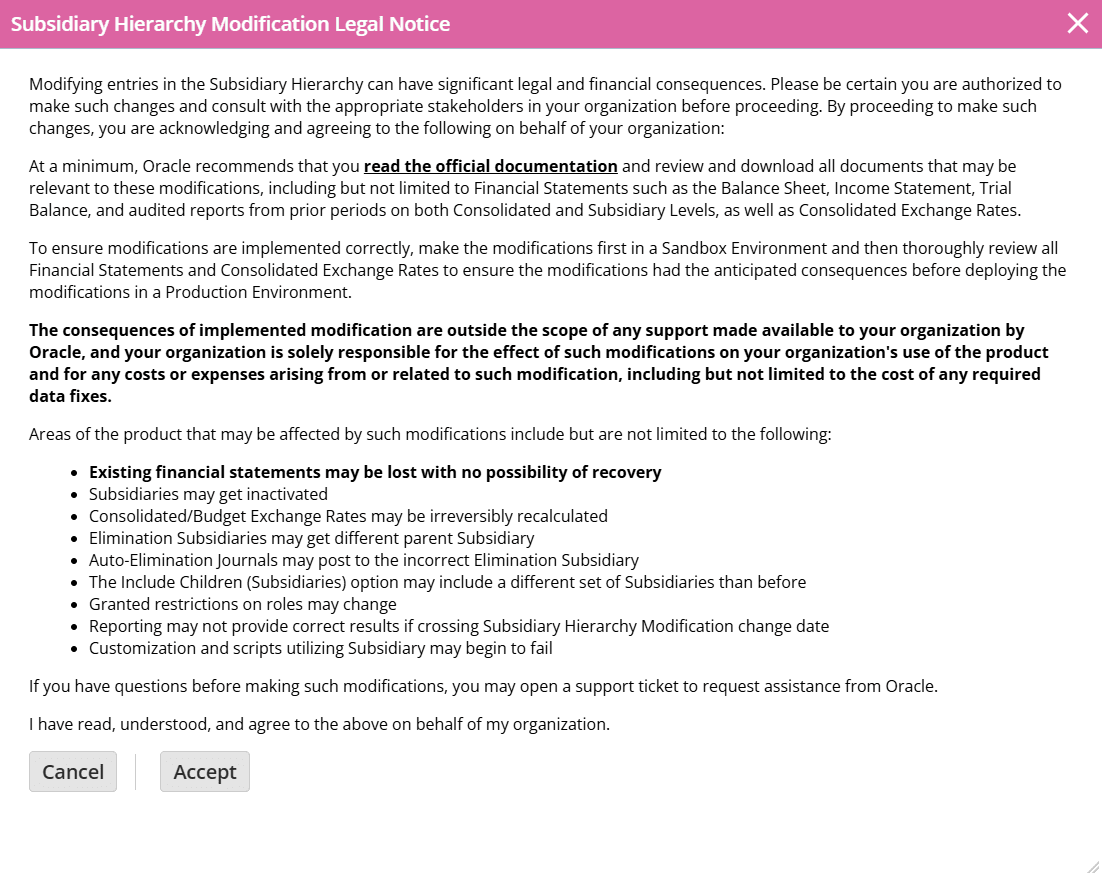
You must explicitly click “Accept” to finalize the preference change. If you do not accept the notice, the field automatically wipes itself out, and the database locks down immediately. Once saved, a background process runs; depending on the volume of transaction history tied to your root parent, baking this change into the database can take up to 30 minutes of background processing time.
The Bulletproof “Inversion Loop” Execution Plan
Because changing a root parent impacts everything from consolidated financial reporting to historical currency conversions, you must treat this change with surgical care. Never perform this straight in a live workspace.
Export the Financial Archetype
Before altering a single structural line, you must capture an unchangeable record of your historical consolidated financials. Navigate to Lists > Accounting > Consolidated Exchange Rates and export every single historical rate layer to CSV. Next, run and export your Consolidated Balance Sheet and Income Statements for all prior closed fiscal periods. You will need these as your baseline source of truth to tie out against later.
Initialize the Sandbox Lab & Change Workspace Theme
Never execute a structural database modification directly in Production without testing. Trigger a fresh Sandbox refresh to mirror your live data environment. Immediately navigate to Home > Set Preferences > Appearance and flip the Color Theme to Pink. If your screen is loud, bright pink, you are safely testing database manipulations with zero real-world fallout.
Open the 30-Day Configuration Window
Inside your Pink Sandbox, navigate to Setup > Company > General Preferences. Locate the “Allow Subsidiary Hierarchy to be Modified” field. Click the calendar icon and select a date exactly 24 to 48 hours into the future. Read the heavy-duty legal waiver carefully, click Accept, and click Save.
Create and Insert the New Super Parent
First, navigate to Setup > Company > Subsidiaries > New and create your brand-new top-level corporate entity (ensure currency, country, and tax settings are meticulously validated, as these cannot be changed later). Save the new record.
Next, go back to the original root parent subsidiary record and click Edit. Because the modification window is open, the “Parent Subsidiary” field is unlocked. Select your newly created entity from the dropdown list and save. Give NetSuite up to 30 minutes to complete the background database realignment.
This is the same set of decisions that determines whether a multi-entity structure holds up years later, and getting it right during the initial QuickBooks to NetSuite consolidation is far cheaper than reopening the root tree afterward.
Tie-Out Validation & Production Replication
Once processed, run your new Consolidated Balance Sheet and cross-reference it against the Excel sheets you exported in Step 1. Check your historical consolidated exchange rates. If the numbers match perfectly and your reporting segments tie out, log into your blue Production environment and execute the exact same sequence with absolute precision.
Navigating Global Corporate Restructuring on NetSuite OneWorld?
Altering root architectural trees, managing private equity company roll-ups, and executing complex post-merger database alignments requires deep system forensics. At Acgile, our elite NetSuite data migration team untangles complex ERP ecosystems so your data remains flawless.